Mirror Hugo Sites Across GitLab and Cloudflare Pages
· Updated: Jul 27, 2026 · Hugo, Cloudflare, Deployment
Table of contents
Introduction
When mirroring your Hugo site with GitLab and Cloudflare, it’s important that the site is fully functional. The build process depends on the baseURL configuration in your Hugo config.yaml. To make this work without issues, you need to adjust the build command for both GitLab Pages and Cloudflare Pages. This guide walks you through the process.
Cloudflare Pages
Cloudflare Pages automatically follows your GitLab or GitHub repository. Here are the steps to set it up:
Step 1: Adding Environment (Optional)
To manage your domain effectively, consider adding an environment variable:
- Navigate to Worker & Pages -> Settings -> Environment variables.
- Add the variable:
- Variable name:
CF_PAGES_URL - Value: Your Cloudflare Pages domain.
- Variable name:
Step 2: Build Command
Adjust the build command to include the baseURL when building the Hugo site:
- Navigate to Builds & Deployments -> Build Configurations -> Edit Configurations.
- Update the Build command:
hugo --baseURL $CF_PAGES_URL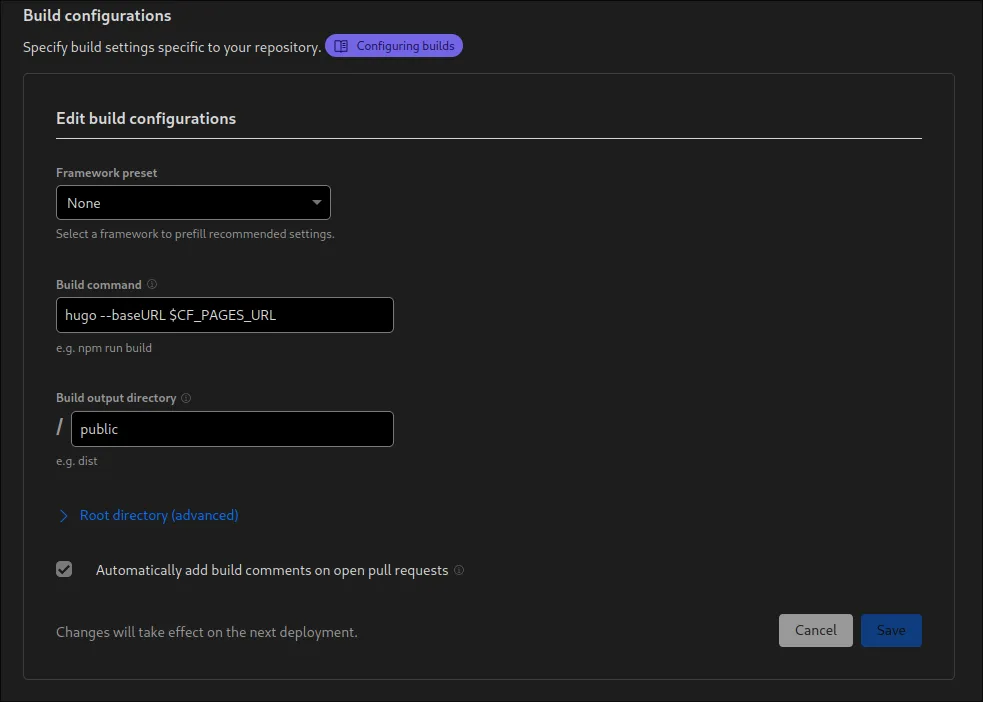
GitLab Pages
For GitLab Pages, you can use CI/CD GitLab Actions. Here is an example of a GitLab CI configuration for Hugo:
default:
  image: '${CI_TEMPLATE_REGISTRY_HOST}/pages/hugo:0.121.1'

variables:
  GIT_SUBMODULE_STRATEGY: recursive
  GL_PAGES_URL: domain.com

pages:
  script:
    - hugo -b $GL_PAGES_URL
  artifacts:
    paths:
      - public
  rules:
    - if: $CI_COMMIT_BRANCH == $CI_DEFAULT_BRANCH
  environment: production
This configuration ensures that the baseURL is correctly set during the Hugo build process for GitLab Pages.
GitHub
Coming soon …
git:
  depth: false

env:
  global:
    - HUGO_VERSION="0.121.1"
  matrix:
    - YOUR_ENCRYPTED_VARIABLE

install:
  - wget -q https://github.com/gohugoio/hugo/releases/download/v${HUGO_VERSION}/hugo_${HUGO_VERSION}_Linux-64bit.tar.gz
  - tar xf hugo_${HUGO_VERSION}_Linux-64bit.tar.gz
  - mv hugo ~/bin/

script:
  - hugo -b $GH_PAGES_URL

deploy:
  provider: pages
  skip-cleanup: true
  github-token: $GITHUB_TOKEN
  keep-history: true
  local-dir: public
  repo: gh-username/gh-username.github.io
  target-branch: master
  verbose: true
  on:
  branch: master
Conclusion
With the steps above for both Cloudflare Pages and GitLab Pages, your Hugo site is mirrored and built with the specified baseURL, giving you a fully functional and mirrored website.